What Is AI Pair Programming and How Does It Improve Software Development?
August 15, 2026
By Cloudester Team
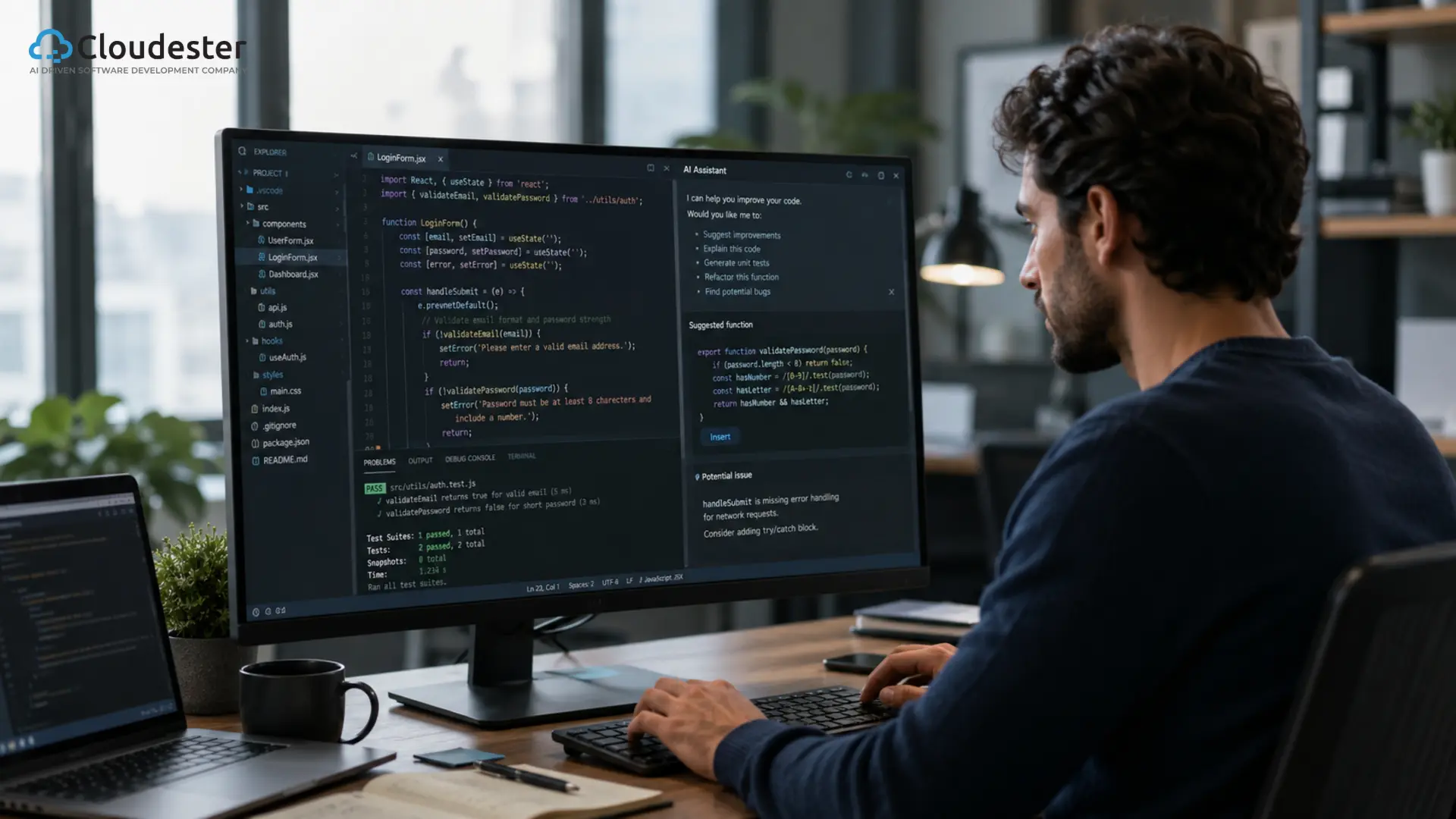
AI Generated. Credit: ChatGPT
Software development has changed more in the last 2 years than in the decade before it, and most of that shift traces back to one thing: AI-assisted software development now happens inside the editor, not just in a browser tab. AI pair programming is the clearest example of that shift.
It takes the old practice of two developers working through a problem together and hands one of those roles to an AI model that can read code, suggest fixes, and reason through logic in real time.
Developers are adopting it because it removes friction from the parts of coding that used to eat up hours, and businesses are adopting it because it means shipping features faster without necessarily growing the team.
What Is AI Pair Programming?
AI pair programming is a development practice where a programmer works alongside an AI coding assistant that suggests code, explains logic, catches bugs, and helps refactor in real time, much like a human pairing partner would.
Traditional pair programming puts two developers at one keyboard, one writing while the other reviews and thinks a step ahead. AI pair programming keeps that same rhythm but swaps the second developer for a model trained on massive amounts of code.
The AI doesn’t get tired, doesn’t need a coffee break, and is available at 2 am just as easily as 2 pm. It acts as a coding partner by reading the surrounding context, understanding what a function is trying to do, and offering the next few lines, a fix, or an explanation the moment they’re needed.
Here’s a quick example. A developer building a login form types a comment describing what they need: “validate email format and check password strength.”
An AI coding assistant reads that comment, looks at the rest of the file, and writes the validation function on the spot, ready for the developer to review and adjust.
How Does AI Pair Programming Work?
Understanding the workflow makes it easier to see why this has caught on so fast. It usually starts with prompting the AI, either through a comment, a chat message, or simply by typing and letting the assistant predict what comes next.
From there, the AI offers code suggestions based on the surrounding file and, in more advanced tools, the entire codebase. When something isn’t clear, the developer can ask for code explanations, and the AI walks through what a block of code actually does and why. Refactoring works the same way.
A developer can ask the assistant to clean up a messy function, and it restructures the logic while keeping the behavior the same.
The workflow doesn’t stop at AI code generation either. Most AI developer tools now offer testing assistance, generating unit tests based on the function they just helped write.
Documentation generation happens almost automatically, turning a function’s logic into a clear docstring or README section.
And when something breaks, debugging support lets a developer paste an error message and get a plausible explanation of what went wrong, often along with a fix.
Benefits of AI Pair Programming
The reason this workflow has spread so quickly comes down to results developers can actually feel day to day.
Faster Development
Code that used to take an hour to write can often be drafted in minutes, with the developer reviewing rather than typing from scratch.
Better Code Quality
AI suggestions often follow common patterns and best practices, which nudges the whole codebase toward more consistent style.
Fewer Bugs
Catching an issue during suggestion or review is cheaper than catching it after deployment.
Faster Learning for Junior Developers
New developers get instant explanations instead of waiting on a senior teammate, which shortens the ramp-up period significantly.
Improved Productivity
Less time spent on boilerplate means more time spent on the actual problem being solved.
Better Documentation
Documentation that used to get skipped under deadline pressure now gets generated as part of the workflow.
Reduced Development Costs
Faster cycles and fewer post-release bugs add up to real savings over the life of a project.
Best AI Pair Programming Tools in 2026
Not every one of these AI programming tools is built the same way, and the right pick depends on the kind of work a team does.
| Tool | Best For | Key Features |
| GitHub Copilot | Enterprise | Context-aware suggestions |
| Cursor AI | Full-stack developers | AI-first IDE |
| Claude Code | Large codebases | Deep reasoning |
| Gemini Code Assist | Google ecosystem | Workspace integration |
| Amazon Q Developer | AWS developers | Cloud-native development |
GitHub Copilot remains a common enterprise default largely because of how deeply it plugs into the GitHub ecosystem teams already use.
Cursor AI takes a different approach, building an entire AI-first IDE around the workflow rather than bolting AI onto an existing editor.
Claude Code leans into deep reasoning across large, complex codebases, which makes it a strong fit for teams doing heavy refactoring or navigating unfamiliar repositories.
Gemini Code Assist is the natural choice for teams already living inside Google Cloud and Workspace, and Amazon Q Developer does the same for teams building on AWS.
According to the 2025 Stack Overflow Developer Survey, 84% of developers now use or plan to use AI coding tools, with 51% using them daily, which says a lot about how normal this has become in such a short window.
AI Pair Programming vs Traditional Pair Programming
The two approaches share a rhythm, but they differ in almost every practical way.
| Feature | Traditional | AI Pair Programming |
| Cost | Two salaries for one task | One developer plus a tool subscription |
| Availability | Limited to working hours | Available any time, any timezone |
| Speed | Bound by human typing and thinking speed | Suggestions appear almost instantly |
| Learning | Deep mentorship and context sharing | Fast explanations, less nuance |
| Feedback | Immediate, human judgment | Immediate, pattern-based judgment |
| Scalability | Hard to scale across a large team | Scales to every developer at once |
Traditional pairing still wins on nuance and mentorship, the kind of judgment that comes from someone who knows the business, the team, and the tradeoffs behind a decision.
AI pair programming wins on availability and scale, since it can support every developer on a team at the same time without splitting anyone’s attention.
Real-World Use Cases
AI pair programming shows up across nearly every kind of software work today.
In web development, it speeds up building components and wiring up APIs. In mobile app development, it helps developers move faster across both iOS and Android codebases without needing to hold every platform quirk in memory.
SaaS product development benefits from faster iteration, since teams can test ideas and ship changes without waiting on a full sprint cycle. API development gets faster too, with AI drafting endpoints, request validation, and documentation together.
Legacy code modernization is one of the more surprising wins, since AI coding assistants can read old, undocumented code and explain what it does before a team touches it.
Enterprise software development uses AI pair programming to keep large teams consistent across a sprawling codebase, and code reviews move faster when an AI flags obvious issues before a human reviewer even opens the pull request.
Best Practices for Effective AI Pair Programming
- Getting real value out of an AI coding assistant depends more on how a team uses it than which tool they pick.
- Write clear prompts, since vague instructions lead to vague code.
- Review every suggestion before accepting it, the same way you’d review a teammate’s pull request.
- Never copy blindly. Suggestions can look correct and still miss an edge case.
- Protect sensitive code by knowing what a tool sends to external servers and what stays local.
- Keep human oversight on architectural decisions the AI doesn’t have full context for.
- Validate security on anything touching authentication, payments, or user data.
- Test generated code the same way you’d test code written by a person.
- Use version control effectively, committing in small chunks, so AI-generated changes are easy to review or roll back.
Common Challenges and Limitations
AI pair programming isn’t without real limitations, and it’s worth knowing them going in. Hallucinated code is the most talked-about issue, where an AI confidently generates a function or API call that doesn’t actually exist.
Security concerns come up often too, since a suggestion might quietly introduce a vulnerability that looks fine on the surface. Licensing considerations matter as well, given that some tools are trained on public code with terms worth understanding.
Context limitations still trip up even strong tools, especially on very large codebases where the AI can’t see everything at once. Over-reliance on AI is a quieter risk, where developers stop questioning suggestions and skills start to atrophy.
Data privacy is a real concern for any company sending proprietary code to a third-party model.
And performance optimization still needs humans, since AI is good at pattern-matching but not always great at judging tradeoffs specific to a system’s real-world load.
Custom AI Software Development Solution For Enterprises
Is AI Pair Programming Safe for Enterprise Development?
For most enterprise teams, the answer comes down to how well the rollout is governed rather than the technology itself. Strong security policies need to define exactly what code and data can be shared with an AI tool.
Self-hosted AI models are becoming a common answer for companies that can’t send proprietary code to a third party at all.
Code governance matters just as much, setting clear rules for how AI-generated code gets reviewed before it merges. Compliance requirements, especially in regulated industries, often shape which tools are even allowed on the approved list.
Access controls keep AI tools scoped to what a given developer or team actually needs. And a solid human review process ties all of this together, making sure a person signs off before AI-assisted code reaches production.
Businesses exploring custom AI solutions for their engineering teams often bring in an AI development company like Cloudester Software to design this kind of rollout properly from the start, instead of adopting tools ad hoc and dealing with the gaps later.
Future of AI Pair Programming
The pace of change here hasn’t slowed down, and a few trends stand out. Agentic AI is moving pair programming from suggestion-based help toward tools that can plan and execute multi-step tasks on their own.
Autonomous coding agents take that further, handling an entire feature from a single instruction with minimal check-ins along the way.
Multi-agent development is starting to show up too, where several specialized AI agents divide a task: one writing code, another testing it, another reviewing it. IDE-native AI is becoming the default rather than an add-on, built directly into the editor instead of bolted on as a plugin.
All of this is part of a bigger shift toward AI software engineering as its own discipline, where the AI does more than assist and starts genuinely collaborating on system design. Human-AI collaboration remains the throughline across all of it.
The tools are getting more capable, but the best results still come from a developer who knows when to trust the suggestion and when to override it.
FAQs
What is AI pair programming?
It’s the practice of coding alongside an AI assistant that suggests code, explains logic, and helps debug in real time, similar to traditional pair programming but with an AI instead of a second developer.
How is AI pair programming different from GitHub Copilot?
GitHub Copilot is one specific tool used for AI pair programming. The practice itself covers any workflow where a developer codes alongside an AI coding assistant, whether that’s Copilot, Cursor AI, Claude Code, or another AI programming tool.
Which AI tool is best for pair programming?
It depends on the work. GitHub Copilot fits enterprise teams already on GitHub, Cursor AI suits full-stack developers who want an AI-first IDE, and Claude Code stands out for large, complex codebases that need deep reasoning.
Can beginners use AI pair programming?
Yes, and it often shortens the learning curve significantly, since a beginner can ask for explanations instead of waiting for a senior developer to be free.
Does AI pair programming replace software developers?
No. It changes what developers spend their time on, but decisions about architecture, tradeoffs, and business logic still need a person in the loop.
Is AI-generated code secure?
Not automatically. AI-generated code needs the same security review as any other code, since suggestions can introduce vulnerabilities that aren’t obvious on first read.
Can AI help debug code?
Yes. Most AI coding assistants can read an error message and the surrounding code, then suggest a likely cause and a fix.
Which programming languages support AI pair programming?
Most major tools support widely used languages like JavaScript, Python, Java, and Go well, with support for other languages varying by tool.
Is AI pair programming suitable for enterprise projects?
Yes, as long as it’s rolled out with clear security policies, access controls, and a human review process in place.
What are the best practices for using AI pair programming?
Write clear prompts, review every suggestion, protect sensitive code, keep humans in charge of architecture, and test AI-generated code the same way you’d test anything else.
Conclusion
AI pair programming has earned its place in modern software development because it removes friction without removing the developer from the loop. It speeds up the repetitive parts of coding, catches issues earlier, and helps junior developers learn faster, while judgment calls stay with the people who understand the business behind the code.
The value isn’t in replacing developers. It’s in giving them a tireless partner for the parts of the job that used to slow everyone down, as long as organizations don’t skip the guardrails: clear policies, human review, and thoughtful tool selection matter as much as the AI itself.
If your team is building a responsible AI coding workflow from the ground up, Cloudester Software can help bring AI pair programming into your process the right way, with oversight built in from day one.
Back
Latest posts



July 30, 2026