
September 16, 2026
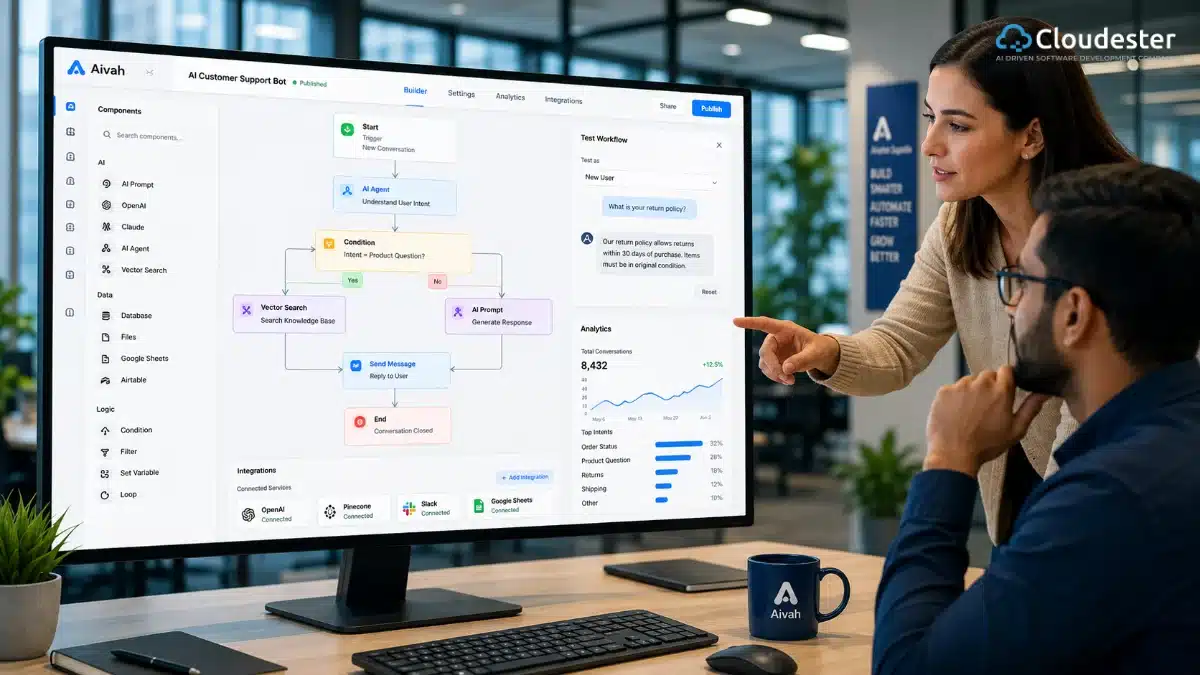
AI Generated. Credit: ChatGPT
The demand for AI-powered applications has grown faster than many businesses expected. Companies want intelligent chatbots, automated workflows, content assistants, recommendation systems, and document processing tools. At the same time, hiring experienced AI developers remains expensive and time-consuming. A no-code AI builder bridges that gap. Instead of writing thousands of lines of code, users can create functional AI applications through visual editors, drag-and-drop components, and prebuilt integrations. Marketing teams, operations managers, educators, entrepreneurs, and customer support departments can all build useful AI solutions with minimal technical knowledge.
That doesn’t mean coding has disappeared. Rather, no-code platforms make AI development accessible for projects that once required dedicated engineering teams. Understanding where these platforms excel, and where they fall short, helps you choose the right approach for your business.
A no-code AI builder is a visual software platform that allows users to create AI-powered applications, chatbots, automations, and workflows without writing programming code. It uses drag-and-drop interfaces, prebuilt templates, AI models, and integrations so individuals and businesses can build and deploy intelligent solutions faster.
AI has become practical for everyday business operations. Customer support teams want instant responses. Sales departments need automated lead qualification. HR teams process hundreds of resumes. Marketing professionals create content at scale.
Traditional software development often creates bottlenecks because every small change depends on developers.
A no-code platform changes that workflow.
Business users can update prompts, modify workflows, connect new services, and launch improvements without waiting weeks for engineering resources.
As a result, organizations become more agile.
According to industry research from leading technology analysts, companies continue to increase investments in low-code and no-code technologies because they reduce development time and improve business productivity.
Traditional AI development usually involves several stages:
Each phase requires technical expertise.
A no-code AI builder replaces much of this work with reusable components.
For example, creating an AI-powered customer support assistant may take weeks through traditional development. Using a visual builder, the same proof of concept can often be completed within hours.
Hiring experienced AI engineers, machine learning specialists, and cloud architects represents a significant investment.
Many organizations simply need practical automation rather than highly customized AI infrastructure.
No-code platforms reduce costs by offering:
Instead of paying for infrastructure management, businesses can focus on solving operational problems.
One of the biggest strengths of no-code development is collaboration.
Marketing teams can design content workflows.
Customer support managers can improve chatbot responses.
HR departments can automate employee onboarding.
Operations teams can streamline repetitive tasks.
Instead of relying entirely on developers, business experts contribute directly to application design.
That often leads to better outcomes because the people closest to the process build the solution.
Rather than writing code, users assemble applications using visual building blocks.
A typical project includes:
Each component connects through drag-and-drop actions.
For example:
Modern no-code platforms connect with powerful AI models through secure APIs.
These models can perform tasks such as:
Users simply configure prompts, define rules, and select outputs.
The platform manages the technical communication with the AI service.
Most businesses already use multiple software applications.
A quality no-code AI builder supports integrations with tools such as:
This allows AI workflows to fit naturally into existing business operations instead of replacing them.
The workflow editor serves as the foundation of every no-code platform.
Look for builders that make it easy to:
A clean interface reduces the learning curve and speeds up adoption.
Businesses often work with different AI providers depending on their needs.
A flexible platform should support multiple models instead of locking users into one ecosystem.
This approach improves scalability and allows organizations to adapt as AI technology evolves.
Templates save considerable time.
Instead of building everything from scratch, users can customize prebuilt solutions for:
Templates also help beginners understand how successful AI workflows are structured.
AI applications frequently process sensitive business information.
Choose platforms that prioritize:
Security should remain a priority from the first workflow to enterprise deployment.
A no-code AI builder is flexible enough to support a wide range of business functions. Instead of replacing employees, it helps them complete repetitive tasks faster and with fewer errors.
Here are some of the most valuable use cases.
Customer support teams often receive the same questions every day.
Examples include:
An AI-powered chatbot can answer these questions instantly, allowing support agents to focus on more complex issues.
Real-world example
An online retailer can deploy a chatbot that checks order status, explains return policies, and recommends products. Customers receive immediate answers, while support costs decrease.
Employees waste valuable time searching through documents, policies, and training materials.
A no-code AI builder can create an internal assistant that searches company documents and provides accurate answers within seconds.
This works well for:
Instead of opening multiple files, employees simply ask a question in natural language.
Sales teams spend significant time identifying qualified leads.
AI can automate this process by:
As a result, sales representatives spend more time closing deals instead of sorting inquiries.
Marketing teams often create:
A no-code AI builder can automate these workflows while allowing editors to review and refine the final content before publishing.
Businesses handle thousands of documents every year.
Examples include:
AI can extract important information, organize documents, and send them to the correct department automatically.
Human Resources teams manage many repetitive administrative tasks.
AI workflows can assist with:
This improves employee experience while reducing manual work.
Almost every industry can benefit from AI automation. However, some sectors see faster adoption because they process large volumes of data and repetitive requests.
Healthcare organizations use AI to:
Medical decisions should always remain under the care of qualified healthcare professionals, but administrative automation can significantly improve efficiency.
Banks and financial institutions automate tasks such as:
AI helps reduce response times while maintaining consistent processes.
Retail businesses commonly use AI for:
Customers receive faster service throughout their buying journey.
Schools, universities, and training providers use AI assistants to answer questions about:
This reduces administrative workload and improves student support.
Manufacturers benefit from AI-powered workflows for:
Automation helps teams respond faster while reducing paperwork.
No-code platforms work best when speed matters more than deep customization.
A no-code AI builder is an excellent choice if you want to:
Many startups begin with no-code platforms because they can validate ideas before investing in custom development.
Although no-code platforms are powerful, they are not the perfect solution for every project.
Traditional development may be the better option if you require:
For organizations building core products around AI, custom software often provides greater flexibility and long-term scalability.
| Feature | No Code AI Builder | Traditional Development |
|---|---|---|
| Coding Skills | Not required | Required |
| Development Speed | Very fast | Slower |
| Initial Cost | Lower | Higher |
| Flexibility | Moderate | Very High |
| Maintenance | Easier | Developer dependent |
| Customization | Limited | Extensive |
| Learning Curve | Easy | Steep |
| Deployment | Faster | Longer |
| Best For | Business automation | Enterprise software |
| Pros | Cons |
|---|---|
| Faster development | Limited customization |
| Lower costs | Platform dependency |
| Easy to learn | May have usage limits |
| Built-in AI integrations | Complex workflows can become difficult |
| Quick deployment | Vendor pricing may increase over time |
| Ideal for prototypes | Not suitable for every enterprise project |
| Enables business users | Performance depends on the platform |
Even if you have never built software before, the process is easier than many people expect.
Avoid starting with technology.
Instead, identify a repetitive task that consumes time.
For example:
A clear business objective leads to a more useful AI application.
AI performs best when it has access to accurate information.
Prepare resources such as:
High-quality information produces better responses.
Compare platforms based on:
Choose one that matches both your current needs and future growth plans.
Map each step visually.
Example:
Customer Question
↓
AI Searches Knowledge Base
↓
Generate Response
↓
Send Reply
↓
Save Conversation
Testing the workflow before deployment helps identify missing steps.
Don’t assume everything works perfectly.
Ask employees or customers to try different scenarios.
Watch for:
Small improvements during testing often lead to a much better user experience.
Deployment is only the beginning.
Track:
Continuous improvements keep the application useful as business needs evolve.
Following a few proven practices can improve both performance and user satisfaction.
Organizations that treat AI as an ongoing improvement process often achieve better long-term results than those seeking a one-time deployment.
Many first-time projects fail because teams overlook basic planning.
Avoid these common mistakes:
Keeping the first project focused makes future expansion much easier.
Businesses that achieve strong results with no-code AI often follow similar strategies.
Begin with measurable goals. Define success before building anything. For example, reduce support response time by 50% or automate 70% of repetitive inquiries.
Involve business users early. They understand daily challenges better than anyone else and can identify opportunities for meaningful automation.
Improve prompts continuously. Small prompt refinements often produce significant improvements in response quality.
Use AI to assist people, not replace them. Human review remains valuable for high-risk decisions, customer relationships, and sensitive business processes.
Think beyond chatbots. Many organizations discover their greatest value comes from document processing, workflow automation, and internal knowledge assistants rather than customer-facing applications.
Also read: Why Rapid App Development is the Key to Modern Business Success?
A no-code AI builder has changed how businesses approach AI development. Teams no longer need months of development or a large engineering budget to launch useful AI applications. With visual workflows, prebuilt integrations, and access to powerful AI models, organizations can automate repetitive tasks, improve customer experiences, and test new ideas much faster.
That said, success depends on more than choosing the right platform. The best projects start with a clear business problem, use reliable data, and improve continuously based on user feedback. Small, focused implementations often deliver better results than ambitious projects that try to automate everything at once.
As AI technology continues to evolve, no-code platforms will become even more capable. For startups, small businesses, and enterprises alike, adopting a no-code AI builder can be a practical first step toward building smarter, more efficient business processes.
A no-code AI builder is a visual platform that enables users to create AI-powered applications, chatbots, and automated workflows without writing code. It uses drag-and-drop tools, templates, and AI integrations, making AI development accessible to business users, entrepreneurs, and teams with limited technical expertise.
Yes. Modern no-code AI platforms allow you to build applications using visual editors and prebuilt components. You can connect AI models, databases, APIs, and business tools without programming. However, highly customized enterprise applications may still require professional software development.
These platforms are ideal for startups, small businesses, marketing teams, HR departments, customer support teams, educators, consultants, and operations managers. They are especially useful for anyone who wants to automate repetitive tasks or build AI-powered tools quickly without hiring a large development team.
Yes, many enterprise organizations use no-code AI platforms for internal automation, document processing, employee support, and customer service. For mission-critical systems with complex business logic or advanced security requirements, companies often combine no-code solutions with custom software development.
Look for a platform that offers drag-and-drop workflows, support for multiple AI models, API integrations, database connectivity, security controls, collaboration features, analytics, templates, and scalable deployment options. These features help ensure the platform can grow with your business.
Security depends on the platform you choose and how you configure it. Reputable providers typically offer encryption, user authentication, role-based access, audit logs, and compliance features. Always review the platform’s security documentation before processing sensitive business or customer data.
Although they simplify development, no-code platforms may have limits on customization, performance tuning, and advanced integrations. Very large enterprise systems, proprietary AI models, or highly specialized workflows often require traditional software development to achieve the desired flexibility.
Pricing varies widely. Some platforms offer free plans with limited features, while business and enterprise plans typically charge monthly or annually based on users, workflows, API usage, or AI model consumption. Compare pricing alongside scalability and support before making a decision.
Yes. Most leading no-code AI platforms support integrations with CRM systems, project management tools, cloud storage, email services, databases, and communication platforms. These integrations allow businesses to automate workflows without replacing their existing software ecosystem.
No. They reduce the need for coding in many common business applications, but they do not replace professional developers. Complex enterprise systems, custom AI models, large-scale integrations, and advanced software architectures still require experienced engineering teams.




We specialize in creating high-performance web and mobile apps, seamlessly integrating them with your existing systems to enhance user experiences and streamline business operations.
85 Delancey St, New York NY 10002, United States